A workspace without office clutter
Receive packages, My packages, Expenses and More. It works on the counter computer or the phone already in their hand.
Package intake
Intake the way paqueterías actually price and work. Pick the box, let the customer fill itself in, print the label and give counter staff a focused workspace of their own.
Intake is the part of the day that decides everything after it. If the box goes in wrong, the label is wrong, the manifest is wrong and somebody is on the phone about it a week later. So intake here is built to be quick and fast and hard to get wrong.
First, you file the package by the box it actually came in. Cardboard sizes matched to what Home Depot and Lowe's really stock, or plastic bins by the gallon, from 18 up through 77. That is how paqueterías quote in real life, therefore that is how the form works. If you charge by weight instead, you switch the whole account to weight mode and the form changes for everybody.
Now the customer. You start typing a name and their phone, their address and their destination in Mexico fill themselves in from the last time they came. New customers get saved by themselves the moment you make the package, so there is no separate step where somebody has to go add them. Phones are optional too, because walk-ins sometimes only give you a name, and the app handles a U.S. +1 number or a Mexican +52 one without you thinking about it.
One drop off can be several bins, and each one gets its own label numbered one of four, two of four and so on, so nothing walks off unaccounted for. Every label carries a QR code, which is what the warehouse scans later when the truck gets loaded and what the customer scans to track it.
Also, the customer leaves with something in their hand. You print a receipt with the QR code and the balance due, on a letter sheet or on a 58mm store style roll, and you send them a WhatsApp confirmation carrying the tracking number, the contents, the total, the balance and the tracking link. That one tap is what stops most of the calls before they start.
And if you edit a package after the fact, the app remembers which labels changed and nudges you to reprint just those. Basically it keeps the paper and the record telling the same story.
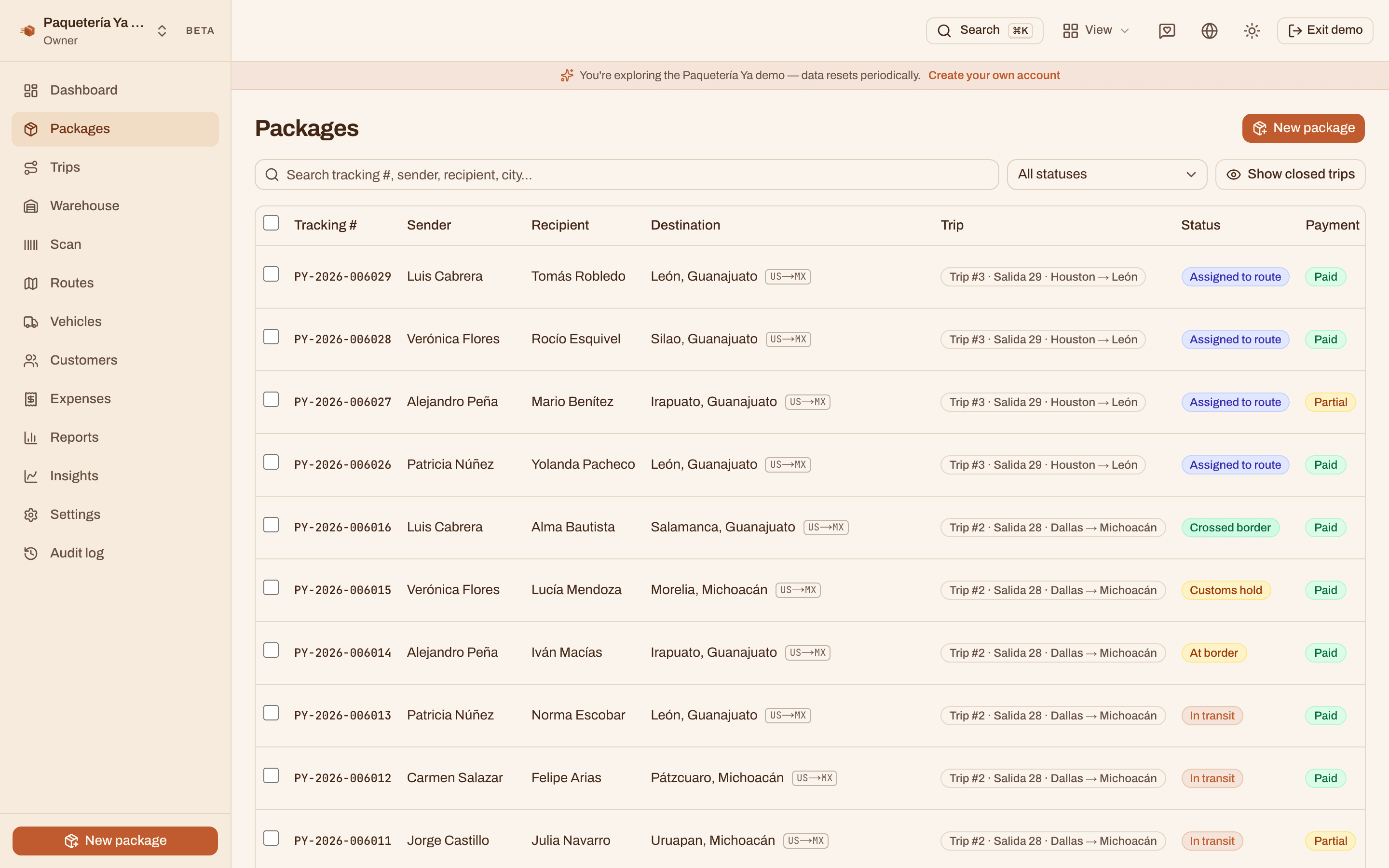
Intake worker role
Give the person at the counter the Intake worker role and they land in a clean workspace for receiving packages, printing labels and receipts, collecting payments and logging pickup expenses. They do not have to work around route maps, company reports or settings just to take in the next box.
Each person gets their own account and sees the package history they created. The owner keeps the full company view, can preview exactly what the role sees and can adjust its starting permissions from Settings.
Receive packages, My packages, Expenses and More. It works on the counter computer or the phone already in their hand.
An intake worker can search, edit, collect payment on and reprint the packages they received, without opening another worker's package history.
Every worker chooses their own language and it follows their account, so one counter can work in English while another works in Spanish.
Autofill finishes the phone, the address and the destination city and state. A brand new customer just gets typed once and saved on their own.
Choose the box type and size, or the bin by the gallon, or enter the weight if that is how your account charges. Add as many bins as the drop off has.
One QR label per bin, numbered so a four bin drop off cannot come up short. They print on a 4x6 thermal printer, and you can print a whole batch at once from the packages list.
Print the receipt with the balance due, then tap once to send the customer their confirmation and tracking link over WhatsApp.
Whatever trip is open and loading is where the package goes. Nobody batch assigns anything at the end of the day.
Press ⌘K and search by a name, a phone in any format, what was in the box, a city or a month written as a word. Accents optional, English or Spanish.
Edit a package and the app flags the labels that went stale, so you reprint those and leave the rest on the boxes.
Yes. Box type and size is the default because that is how most paqueterías quote, but there is a switch that turns the whole account over to weight. It is one setting for the company, so your counter, your labels and your reports all follow the same rule and nobody is mixing the two.
That is one package with four bins on it, not four separate records. Each bin gets its own printed label numbered one of four, two of four and so on, so the warehouse can count them and the customer can see all four on a single tracking page. The quantity on the package always matches the number of bins, therefore the two can never disagree.
Labels are made for a 4x6 thermal label printer, which is the common cheap kind, and they print straight from the browser with no driver setup beyond what the printer already needs. Receipts print either on a normal letter sheet or on a 58mm thermal roll if you have a small store style printer at the counter.
No. You type the name right on the intake form and the customer record saves itself when the package is made. If they have been in before, autofill finishes their phone, address and destination for you. And a walk-in who does not want to give a phone number can be taken in with just a name.
They get a printed receipt with the QR code and their balance, and a WhatsApp confirmation with the tracking number, what was in the box, the total, what is still owed and a link to follow it. Both are in Spanish or English, and the WhatsApp part is one tap from the package screen.
By default they get the counter tools: receive packages, work with the packages they personally received, collect payments, print labels and receipts, and log their own pickup expenses. Company reports, routes, settings and the audit log stay out of the way. The owner can preview the role before inviting anyone.
Yes. The owner can adjust role permissions from Settings. The Intake role keeps package records scoped to the worker who received them; when somebody needs the full office-wide package view, the Worker role is the better starting point.
The demo has customers already saved, so you can watch the autofill work and print a test label without setting anything up.
Open the live demo